![Nimbello_Logo_CMYK_Horzontal_Color_TM.png]](https://www.nimbello.com/hs-fs/hubfs/Nimbello_Logo_CMYK_Horzontal_Color_TM.png?height=40&name=Nimbello_Logo_CMYK_Horzontal_Color_TM.png)
The purpose of Soft Validation Errors is to improve data accuracy by prompting you to manually review information that may be questionable before approving it.
A soft validation is indicated by:
-
A broken red border around the affected field

-
A yellow circular icon with an exclamation mark on the invoice thumbnail which indicates that there is at least one soft validation that needs to be reviewed.
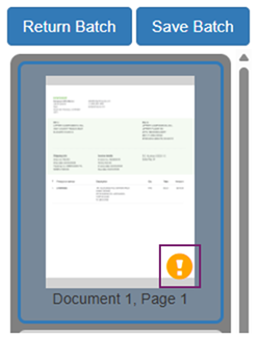
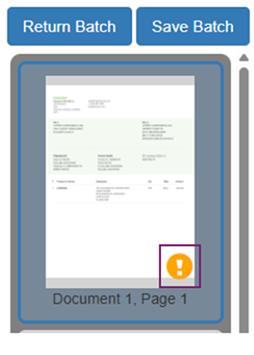
These indicators signal that the field requires review, but they do not prevent submission unless left unaddressed.
How to Approve a Soft Validation
If you review the field and confirm the information is correct, you can approve the soft validation in one of two ways:
1. Approve Individually With "In-Field Approvals"
-
Click into the field so it is active
-
Press Ctrl + Q
2. Approve During Batch Submission
You may continue processing invoices as normal and ignore soft validations while entering data.
When you click Submit:
-
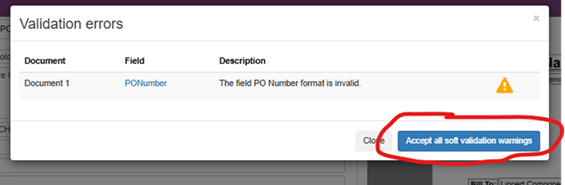
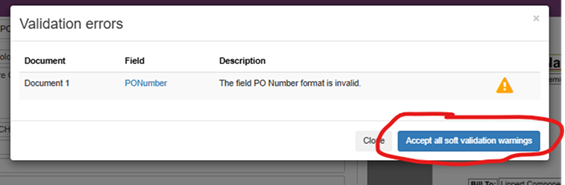
If soft validations exist, a Validation Errors message will appear
-
Click Accept All Soft Validation Warnings
-
The batch will then submit successfully
| Important Note: If any Hard Validations are present, the batch will not submit until those errors are resolved. |