![Nimbello_Logo_CMYK_Horzontal_Color_TM.png]](https://www.nimbello.com/hs-fs/hubfs/Nimbello_Logo_CMYK_Horzontal_Color_TM.png?height=40&name=Nimbello_Logo_CMYK_Horzontal_Color_TM.png)
Manual Creation:
The Recurring Invoice Creation Page is found under Transactions > Recurring Invoice Creation.
In this page, you can set up the information needed for the invoice/s that will be created:

All elements need to be selected except “Auto Schedule” and “End Date,” which only need to be selected if you wish an invoice to be created monthly on a Schedule, and “Approval Group.”
The elements that are selected outside of those elements determine the information assigned to the invoice (Vendor, Invoice #, Amount, Product Description of the line item, and invoice date)
If you do not have this on a schedule, you can just click “Create” to trigger the creation of the invoice:

This will create an invoice with the set settings: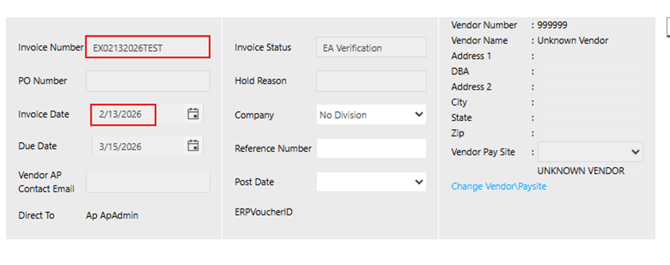
 If
If
Automatic Schedule:
If you wish to set this on an automatic schedule, first notify support@nimbello.com, as we need to set a job in order for this to run properly.
Once you confirm the job is set, you can check “Auto Schedule” and enter an End Date (the rule will stop running after that date):

The invoices will be created monthly, on the same day of the month, starting on the “Invoice Date” (which will adjust to the next month after an invoice is created). For the above configuration, the following invoices will be created:
EX02132026TEST will be created on 02/13/2026, with an invoice date of 02/13/2026
EX03132026TEST will be created on 03/13/2026, with an invoice date of 03/13/2026
EX04132026TEST will be created on 04/13/2026, with an invoice date of 04/13/2026
EX05132026TEST will be created on 05/13/2026, with an invoice date of 05/13/2026
Invoices will stop automatically being created if the current date is after the “End Date,” so unless the “End Date” is updated to a later date, the invoices will stop being created automatically after 05/13/2026.