![Nimbello_Logo_CMYK_Horzontal_Color_TM.png]](https://www.nimbello.com/hs-fs/hubfs/Nimbello_Logo_CMYK_Horzontal_Color_TM.png?height=40&name=Nimbello_Logo_CMYK_Horzontal_Color_TM.png)
Overview
The NonPO Time To Approve reports count invoices by how many days they took to be approved (0-5, 6-10, 11-15, and so on up to 45+). All three reports work the same way and only group the rows differently:
- Report By User shows one row per user.
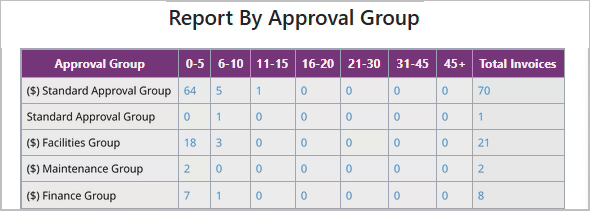
- Report By Approval Group shows one row per approval group.
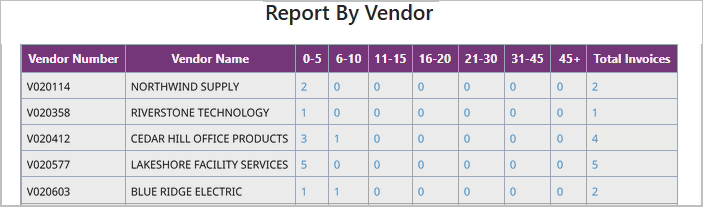
- Report By Vendor shows one row per vendor.
Before you begin: Open the report from the application menu (Reports > Productivity Reports > Non PO Reports > Non PO Time To Approve) and choose Report By User, Report By Approval Group, or Report By Vendor.
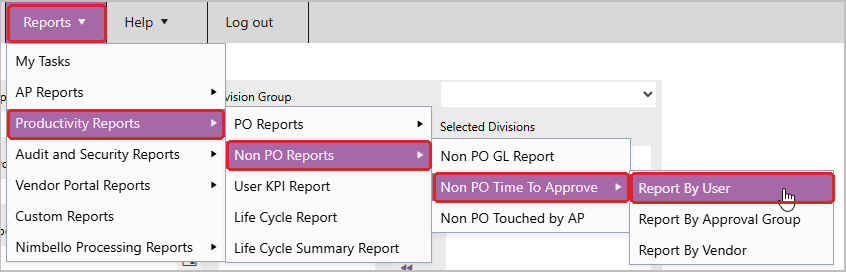
Time To Approve - Run the report
- Enter a date range for the Import, Invoice, or Export dates and click Search. Each row shows how many invoices took each amount of time to approve, with the total at the end. For example, Dana Whitfield had 3 invoices approved in 0-5 days and 1 in 6-10 days.
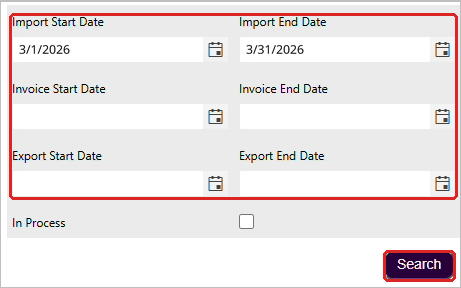
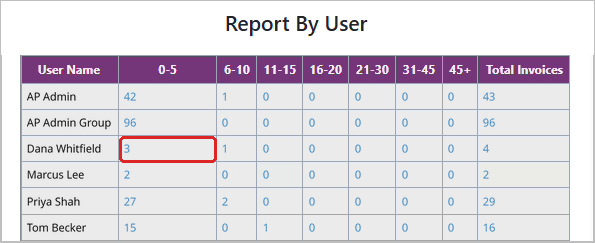
- Click a number to see the invoices behind it. From that list, you can click an Invoice Number to open the invoice details page.

Time To Approve - Report by approval group or vendor
Report By Approval Group and Report By Vendor work the same way as Report By User. Search the same date fields, then click a number to see those invoices. The numbers represent how many invoices were fully approved, grouped by how many days they took to be approved.