![Nimbello_Logo_CMYK_Horzontal_Color_TM.png]](https://www.nimbello.com/hs-fs/hubfs/Nimbello_Logo_CMYK_Horzontal_Color_TM.png?height=40&name=Nimbello_Logo_CMYK_Horzontal_Color_TM.png)
Overview:
Valid files sent via email that can be batched are .pdf, .tif, and .tiff. We can also extract such valid files from email attachments (.eml and .msg)
Common invalid file types are the following: xlsx, .xls, .docx, .xlsm, .zip, .txt, .xml, .gif
If an email contains any of the above listed invalid file type as an attachment, we can batch any valid file types attached to that email, and configure the email to forward to a specific email address (see "Invalid File Review" below).
If an email contains only a valid file type, and none of the previously listed invalid file types, that file will just be batched.
If an email contains neither any of the previously mentioned Valid or Invalid file types, the email will be marked as having "NO VALID/INVALID ATTACHMENTS" and forwarded to a specific user (see "No Valid/Invalid Attachment Review" below)
Invalid File Review:
If an email is sent to the mailbox configured for batching invoices, and it contains a common invalid file type (currently set to the following file types: .xlsx, .xls, .docx, .xlsm, .zip, .txt, .xml, .gif), we can configure the mailbox to forward the message to one or more email accounts, and add “INVALID FILE ATTACHED” to the subject. This is what would be received:
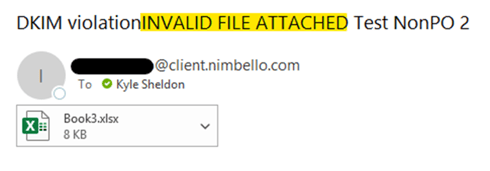
If the email contained both a valid file (.tiff or .pdf) and an invalid file, it would batch the valid file but also forward the email to the configured address for review:
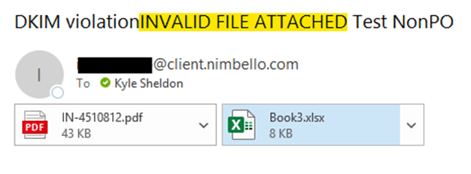
No Valid/Invalid Attachment Review:
If an email does not contain any of the following file types (which are both the Valid file types, and the common invalid file types), we can configure the emails to send to a specific mailbox with the notation "NO VALID/INVALID ATTACHMENT" in the subject: .pdf, .tif, .tiff, .eml, .msg, .xlsx, .xls, .docx, .xlsm, .zip, .txt, .xml, .gif
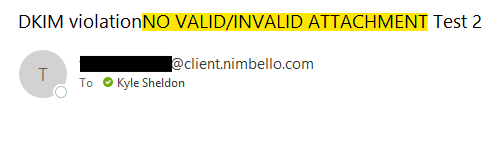
Notes:
- The subject notation (“NO VALID/INVALID ATTACHMENT” or “INVALID FILE ATTACHED”) may, on some occasions, not be added before forwarding. If you receive an email from the address [your company name]@client.nimbello.com, and it does not include one of those phrases in the subject, it will be forwarding to you for one of those two reasons.
- While you'll be receiving emails from [your company name]@client.nimbello.com, do not necessarily trust that any files attached to these are safe, as they are not from Nimbello; they are being automatically sent to you based on certain criteria, and are not manually reviewed by our team. These emails should go through your own system's validation.