![Nimbello_Logo_CMYK_Horzontal_Color_TM.png]](https://www.nimbello.com/hs-fs/hubfs/Nimbello_Logo_CMYK_Horzontal_Color_TM.png?height=40&name=Nimbello_Logo_CMYK_Horzontal_Color_TM.png)
Vendor Address Best Practices
The Vendor OCR and Vendor Address fields are the most important parts of training the OCR system to recognize a vendor correctly and consistently. Getting these two fields mapped accurately, and consistently, will help the system learn faster and work more smoothly.

Important:
The Vendor OCR and Vendor Address fields are used only for OCR training and do not export into the Nimbello workflow.
In short:
Accurate mapping of Vendor OCR + Vendor Address = faster learning and more automatic processing.
The Vendor Address field should capture a consistent, text-based identifier that appears on every invoice for a vendor. The goal is to give OCR a reliable “anchor” to recognize that vendor every time.
Best Practices (What to Do)
Things to keep in mind when selecting information to use in this field.
-
Map from the first page only
Always select Vendor OCR data from the first page of the invoice. -
Use text-based identifiers
Choose typed vendor names whenever possible. -
Prioritize consistency
Select information that appears in the same location across all invoices from that vendor. -
Standardize across users
Ensure all OCR users follow the same mapping rules to maintain consistency. -
Use fallback identifiers when needed
If no text-based vendor name is available, use a consistent alternative such as:-
Website address
-
Phone number
-
Fax number
-
Any repeated, stable identifier in the same location
-
Reminder:
If one of the above options has been used in the Vendor OCR field, it cannot be used in the Vendor Address field.
What to Avoid
-
Do not use logos
Logos are inconsistent and unreliable for OCR data capture. -
Do not mix mapping strategies
Avoid selecting different identifiers for the same vendor across invoices.
Consistency is Key
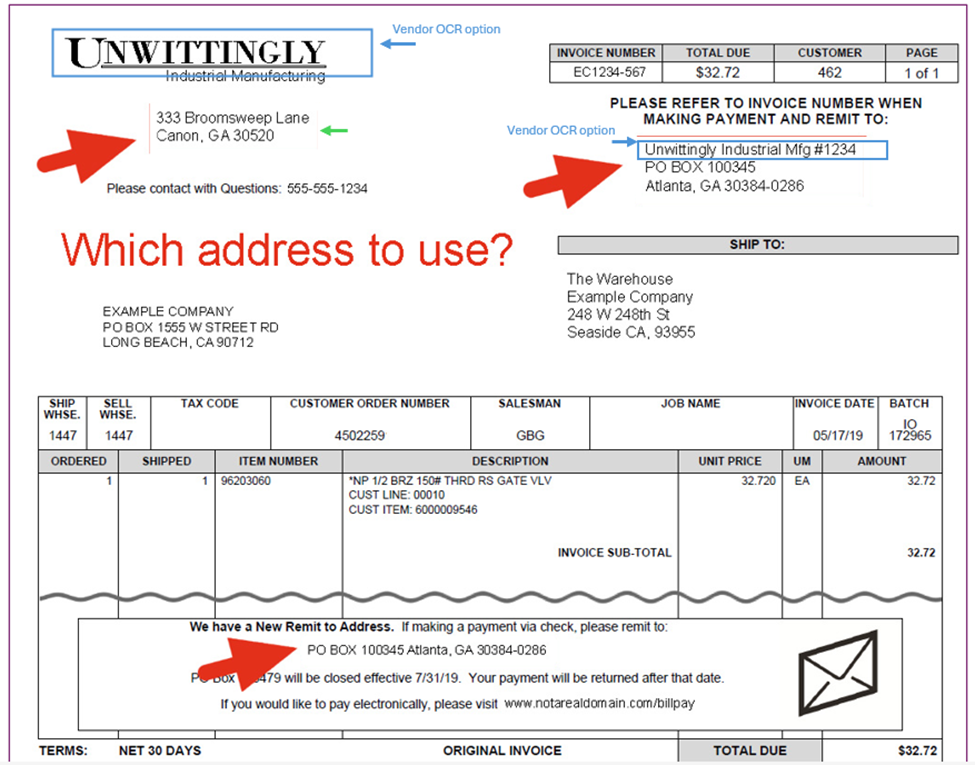
If multiple vendor name options appear on an invoice, always choose the same one every time.
For example:
If a vendor name appears in both the header and the “Remit To” section, select the option that is:
-
More text-based, and
-
More consistently positioned across invoices
In most cases, the “Remit To” section is the best choice because it tends to be more standardized and stable.