![Nimbello_Logo_CMYK_Horzontal_Color_TM.png]](https://www.nimbello.com/hs-fs/hubfs/Nimbello_Logo_CMYK_Horzontal_Color_TM.png?height=40&name=Nimbello_Logo_CMYK_Horzontal_Color_TM.png)
Overview
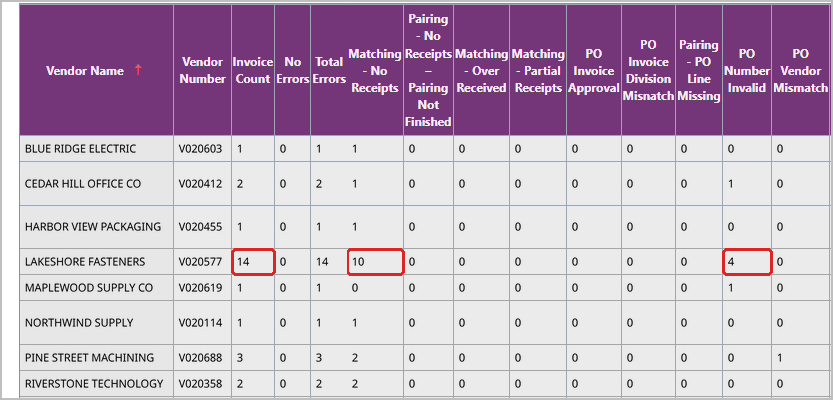
The Error Scorecard Report By Vendor counts the invoices currently in Hold PO for each vendor and breaks that count down by hold reason, such as Matching - No Receipts or PO Number Invalid.
- The report only includes invoices that are in Hold PO now. It does not show invoices that were held in the past.
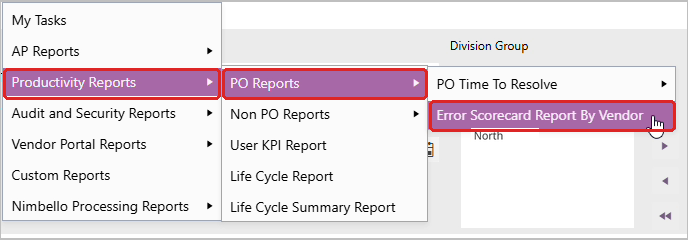
Before you begin: Open the report from the application menu (Reports > Productivity Reports > PO Reports > Error Scorecard Report By Vendor).
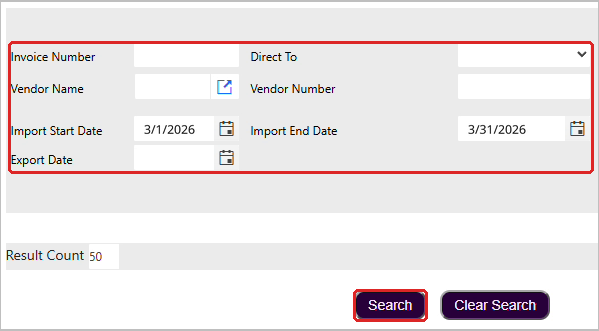
Error Scorecard - Run the report
- Enter at least one search criterion, such as an Import Start Date and Import End Date, and click Search.
- Read each vendor’s row. Invoice Count is the number of that vendor’s invoices in Hold PO, and the columns to the right show how many are held for each reason. For example, Lakeshore Fasteners has 14 invoices in Hold PO: 10 for Matching - No Receipts and 4 for PO Number Invalid.